Visualization
Visualization is an optional, but desirable aspect of tasks. Often,
visualization is an optional step of a task but can also be included
as part of other steps such as init or analysis.
Horizontal visualization of MPAS fields is enabled through the use of
mosaic. While developers can write their
own visualization scripts associated with individual tasks, the following
shared visualization routines are provided in polaris.viz:
common matplotlib style
The context manager polaris.viz.mplstyle_context() applies a common
matplotlib style sheet
that makes font sizes and other plotting options more consistent across
Polaris. The plotting functions described below make use of this common
style. Custom plotting should create and save its figures inside the context
manager:
from polaris.viz import mplstyle_context

with mplstyle_context():
    fig, ax = plt.subplots()
    ...
    fig.savefig(self.work_path('my_plot.png'))
It is a context manager rather than a plain function because matplotlib’s
rcParams are global to the process. Assigning to them leaks the settings
into every plot made afterwards, including plots made by other steps once
steps can run concurrently in a single process. Pass dpi to override the
resolution of saved figures for the duration of the context, rather than
setting rcParams['savefig.dpi'] directly. See Writing task-parallel-safe steps
for the other properties a step needs in order to plot safely alongside other
steps.
horizontal fields from planar meshes
polaris.viz.plot_horiz_field() produces a visualization of
horizontal fields at their native mesh location (i.e. cells, edges, or
vertices) at a single vertical level and a single time step. The image file
(png) is saved to the directory from which
polaris.viz.plot_horiz_field() is called.
polaris.viz.plot_horiz_field() is jut a wrapper for
mosaic.polypcolor(), which automatically detects whether the field
to be plotted is defined at cells, edges, or vertices and generates the patches
(i.e. the polygons characterized by the field values) accordingly.
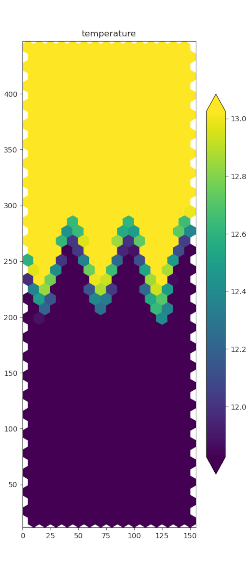
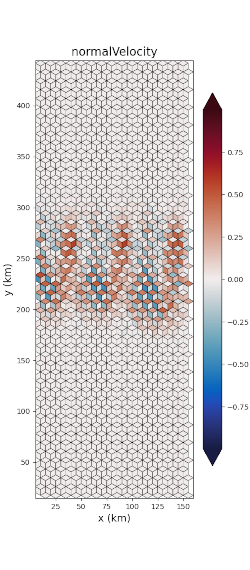
An example function call that uses the default vertical level (top) is:
cell_mask = ds_init.maxLevelCell >= 1
edge_mask = cell_mask_to_edge_mask(ds_init, cell_mask)

plot_horiz_field(ds_mesh, ds['normalVelocity'], 'final_normalVelocity.png',
                 t_index=t_index, vmin=-max_velocity, vmax=max_velocity,
                 cmap='cmo.balance', show_patch_edges=True,
                 field_mask=edge_mask)
The field_mask argument can be any field indicating which horizontal mesh
locations are valid and which are not, but it must be the same shape as data
array being plotted. A typical value for ocean plots is as shown
above: whether there are any active cells in the water column and then the cell
mask is converted to an edges mask using the
polaris.mpas.cell_mask_to_edge_mask() function.
For increased efficiency, you can store the instance of
mosaic.Descriptor returned by plot_horiz_field() and reuse it in
subsequent calls; assuming you are plotting with the same mesh.
cell_mask = ds_init.maxLevelCell >= 1
descriptor = plot_horiz_field(ds_mesh, ds['ssh'], 'plots/ssh.png',
                              vmin=-720, vmax=0, figsize=figsize,
                              field_mask=cell_mask)

plot_horiz_field(ds_mesh, ds['bottomDepth'], 'plots/bottomDepth.png',
                 vmin=0, vmax=720, figsize=figsize, field_mask=cell_mask,
                 descriptor=descriptor)

edge_mask = cell_mask_to_edge_mask(ds_mesh, cell_mask)
plot_horiz_field(ds_mesh, ds['normalVelocity'], 'plots/normalVelocity.png',
                 t_index=t_index, vmin=-0.1, vmax=0.1, cmap='cmo.balance',
                 field_mask=edge_mask, descriptor=descriptor)

...
global lat/lon plots
plotting from spherical MPAS meshes
You can use polaris.viz.plot_global_mpas_field() to plot a field on
a spherical MPAS mesh. Like the planar visualization function, this is also
just a wrapper to mosaic.polypcolor(). Thanks to mosaic variables
defined at cells, edges, and vertices are all support as well as meshes with
culled land boundaries are also supported. While mosaic
supports a variety
of map projection for spherical meshes,
polaris.viz.plot_global_mpas_field() currently only supports
cartopy.crs.PlateCarree.
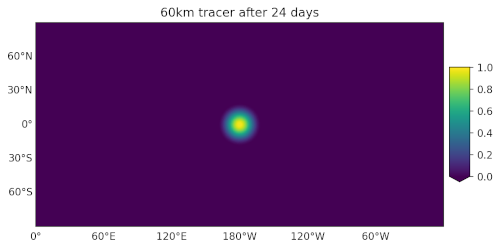
Typical usage might be:
import cmocean  # noqa: F401
import xarray as xr

from polaris import Step
from polaris.viz import plot_global_mpas_field

class Viz(Step):
    def run(self):

        ds = xr.open_dataset('initial_state.nc')
        da = ds['tracer1'].isel(Time=0, nVertLevels=0)

        plot_global_mpas_field(
            mesh_filename='mesh.nc', da=da,
            out_filename='init.png', config=self.config,
            colormap_section='cosine_bell_viz',
            title='Tracer at init', plot_land=False,
            central_longitude=180.)
The mesh must use MPAS dimension and variable names. If it might not, as with
an ocean mesh written for Omega, open it yourself and pass the dataset as
mesh_ds instead of mesh_filename. In the ocean component,
self.open_model_dataset('mesh.nc', config) maps Omega’s names to MPAS-Ocean
names.
The plot_land parameter to polaris.viz.plot_global_mpas_field() is
used to enable or disable continents overlain on top of the data.
The central_longitude defaults to 0.0 and can be set to another value
(typically 180 degrees) for visualizing quantities that would otherwise be
divided across the antimeridian.
The figure is sized to the map. Give either fig_width (the default is 8
inches) or fig_height, and the other dimension is whatever leaves no empty
canvas around the map once the title, the gridline labels and the colorbar
have taken their room. A global map in the Robinson projection therefore
gets a taller figure than one in PlateCarree, and a polar map with a
circular boundary a nearly square one.
The <task>_viz section of the config file must contain config options for
specifying the colormap:
# options for visualization for the cosine bell convergence test case
[cosine_bell_viz]

# colormap options
# colormap
colormap_name = viridis

# the type of norm used in the colormap
norm_type = linear

# A dictionary with keywords for the norm
norm_args = {'vmin': 0., 'vmax': 1.}
colormap_name can be any available matplotlib colormap. For ocean test
cases, we recommend importing cmocean so
the standard ocean colormaps are available.
The norm_type is one of linear (a linear colormap), symlog (a
symmetric log
colormap with a central linear region), or log (a logarithmic colormap).
The norm_args depend on the norm_typ and are the arguments to
matplotlib.colors.Normalize, matplotlib.colors.SymLogNorm,
and matplotlib.colors.LogNorm, respectively.
The config option colorbar_ticks (if it is defined) specifies tick locations
along the colorbar. If it is not specified, they are determined automatically.
plotting from lat/lon grids
You can use polaris.viz.plot_global_lat_lon_field() to plot a field
on a regular lon-lat grid, perhaps after remapping from an MPAS mesh using
polaris.remap.MappingFileStep.
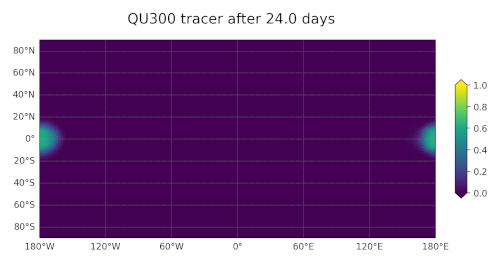
The plot_land parameter to polaris.viz.plot_global_lat_lon_field()
is used to enable or disable continents overlain on top of the data:
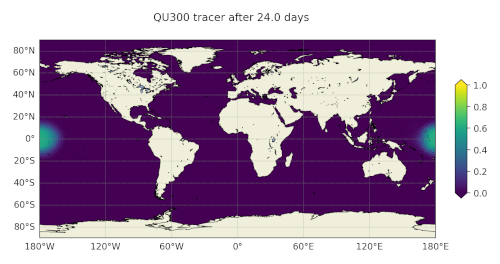
Typical usage might be:
import cmocean  # noqa: F401
import xarray as xr

from polaris import Step
from polaris.viz import plot_global_lat_lon_field

class Viz(Step):
    def run(self):
        ds = xr.open_dataset('initial_state.nc')
        ds = ds[['tracer1']].isel(Time=0, nVertLevels=0)

        plot_global_lat_lon_field(
            ds.lon.values, ds.lat.values, ds.tracer1.values,
            out_filename='init.png', config=self.config,
            colormap_section='cosine_bell_viz',
            title='Tracer at init', plot_land=False)
The <task>_viz of the config file is the same as what’s used by
polaris.viz.plot_global_mpas_field(), and the figure is sized to
the map by fig_width or fig_height in the same way.
latitude-elevation plots
polaris.viz.plot_lat_elevation_field() plots a two-dimensional
field against latitude and elevation as filled contours with contour lines
over them. The meridional overturning streamfunction is the first of these,
but regional overturning, zonal means and meridional heat transport all live
on the same axes.
The vertical axis is elevation in m, positive up, so the sea surface is at the top of an axis that increases upwards.
Typical usage might be:
from polaris import Step
from polaris.viz import plot_lat_elevation_field

class Viz(Step):
    def run(self):
        plot_lat_elevation_field(
            da=streamfunction, lat=lat, z=z,
            out_filename='moc.png', config=self.config,
            colormap_section='ocean_analysis_moc',
            contour_interval=2.0, vmin=-30.0, vmax=30.0,
            title='Global overturning streamfunction',
            colorbar_label='Sv')
da is the field, with one dimension the length of z and one the length of
lat; it is transposed as needed, so the caller does not have to know which
order the model wrote them in. lat and z are the positions the field is
defined at rather than cell boundaries, so a field on latitude bins is
plotted against the centers of those bins.
The colormap_section of the config file is the same as the one
polaris.viz.plot_global_mpas_field() uses. Three arguments layer on
top of it:
vmin,vmaxThe limits of the color map, each replacing the one
norm_argsgives. A diverging field such as a streamfunction is plotted symmetrically about zero withvmin=-vmax.contour_intervalThe spacing of the contour lines drawn over the fill. The lines follow the data rather than the color map, so a color map deliberately clipped to bring out a weak circulation still has lines through the saturated part of it, which is the only thing left there that says how strong the strong part is. Negative contours are dashed, which is what tells the two cells of a circulation apart in black and white. The lines are not labeled; the color bar marks the value of each one that falls within the color map.
The color bar’s arrows are drawn only at the ends the data actually run past, since an arrow is a claim that there is something beyond it. Anything the field is missing — what is below the seafloor — is left unpainted against a neutral gray rather than taking a color from the map, since a gap in the data is not a zero.