Contouring#
Developer: Andrew Nolan (@andrewdnolan)
Overview#
For complete visualization capabilities in mosaic, we need to be able to create contour and filled contour plots. Unfortunately, we are unable to use the existing matplotlib.pyplot.contour and matplotlib.pyplot.contourf functions, due to two matplotlib requirements:
That the
XandYcoordinates arrays represent a regularly spaces, structured grid.That the
Zdata being contoured be coincidental with theXandYcoordinates on the mesh.
The above requirements are enforced, because “under the hood” matplotlib uses the contourpy packages, which is a C++ implementation of the marching squares algorithm. The unstrucuted nature of MPAS meshes prevents (1) from ever being satisfied. Because MPAS meshes represent control volumes, data are not defined at discrete “nodes” but over a control volumes, therefore preventing (2) from being easily satisfied. The analogous marching triangles algorithm could work for out unstructured data, but contourpy has not implemented it. From a cursory look, there do not seem to be any implementations of marching triangles, with a python interface, as mature and well mainted as the marching squares algorithm within contourpy.
Instead, we’ve opted to follow Andrew Robert’s Ridgepack MATLAB package and use the mesh connectivity information to create contours of unstrucuted MPAS meshes. The implementation below follows Ridgepack, but we have opted to avoid a direct port of the MATLAB code. Instead we crib from the approach, but try to implement as much as possible using external python libraries to increase robustness and performance.
Rough Sketch of Implementation#
Let’s start by considering a small (\(20 \times 20\) cell) planar non-periodic MPAS mesh. The initial field we will consider will be a 2D gaussian with an amplitude (\(A\)) of \(2\) and standard deviation (\(\sigma\)) of \(0.15\):
ds = planar_hex_mesh(20)
gauss = gaussian(ds.xCell, ds.yCell)
descriptor = mosaic.Descriptor(ds)
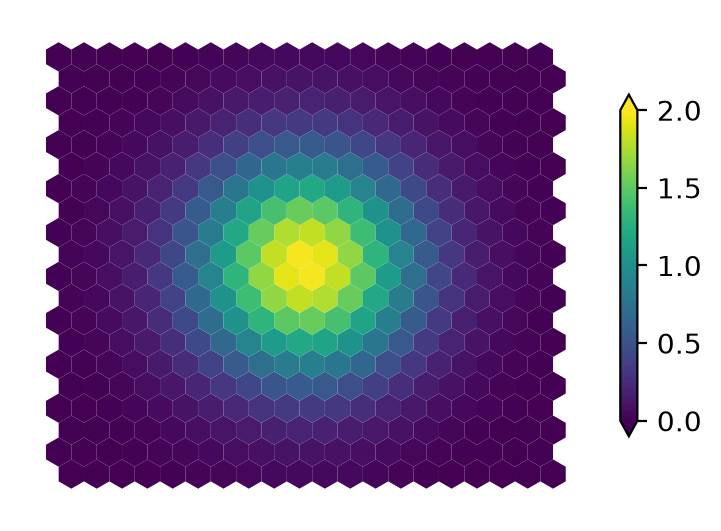
Figure 1. Gaussian kernel with \(A=2\) and \(\sigma=0.15\) evaluated on a \(20\times20\) cell planar non-periodic MPAS mesh.
Now, let’s contour the 1.0 level. Like “Marching Squares” algorithm, we’ll start by creating a boolean mask of cells above and below the contour level.
mask = gauss < 1.0
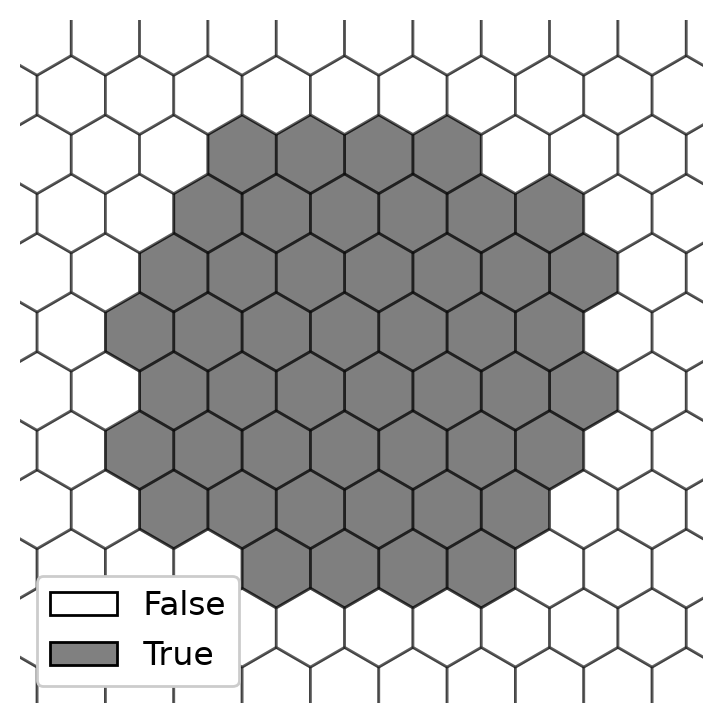
Figure 2. Boolean mask of cells with a value greater than \(1\) for the field plotted above (Figure 1). Gray cells are above (True) and white cells are below (False) the contour level.
From examining the boolean mask, plotted on the native mesh, it becomes clear that one way to display contour boundary is to use the edges of the mesh where the mask is true on one side and false on the other. To identify the edges where this is true, we’ll use the “exculusive or” (i.e. \(\mathrm{XOR}\)) operation along the second dimension of the \(\mathrm{cellsOnEdge}\) array, which is of size \(\mathrm{nEdges} \times 2\).
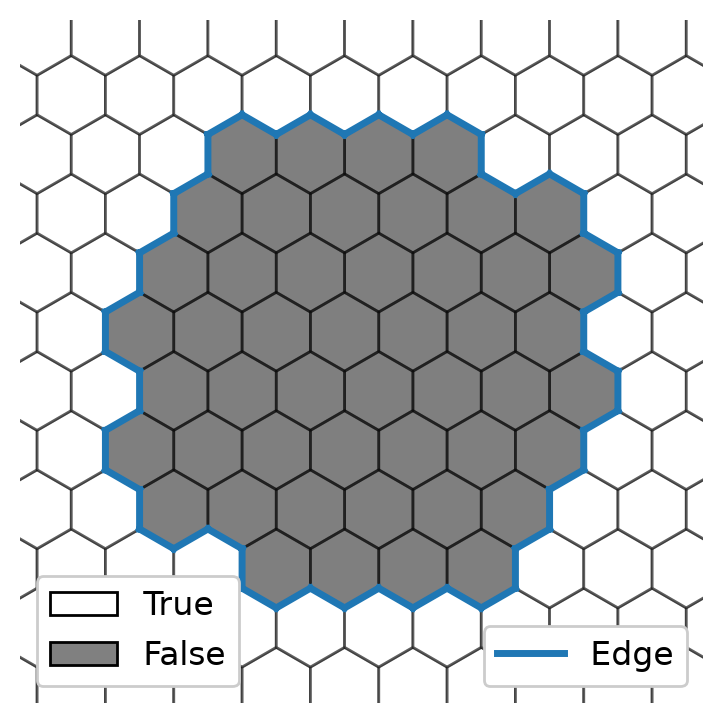
Figure 3. Boolean mask of cells with a value greater than \(1\), with edges corresponding to the contour boundary denoted in blue.
Unfortunately it’s not quite that simple. While we’ve identified the edges that correspond to the contour boundary, the order of those edges are quite important for plotting.
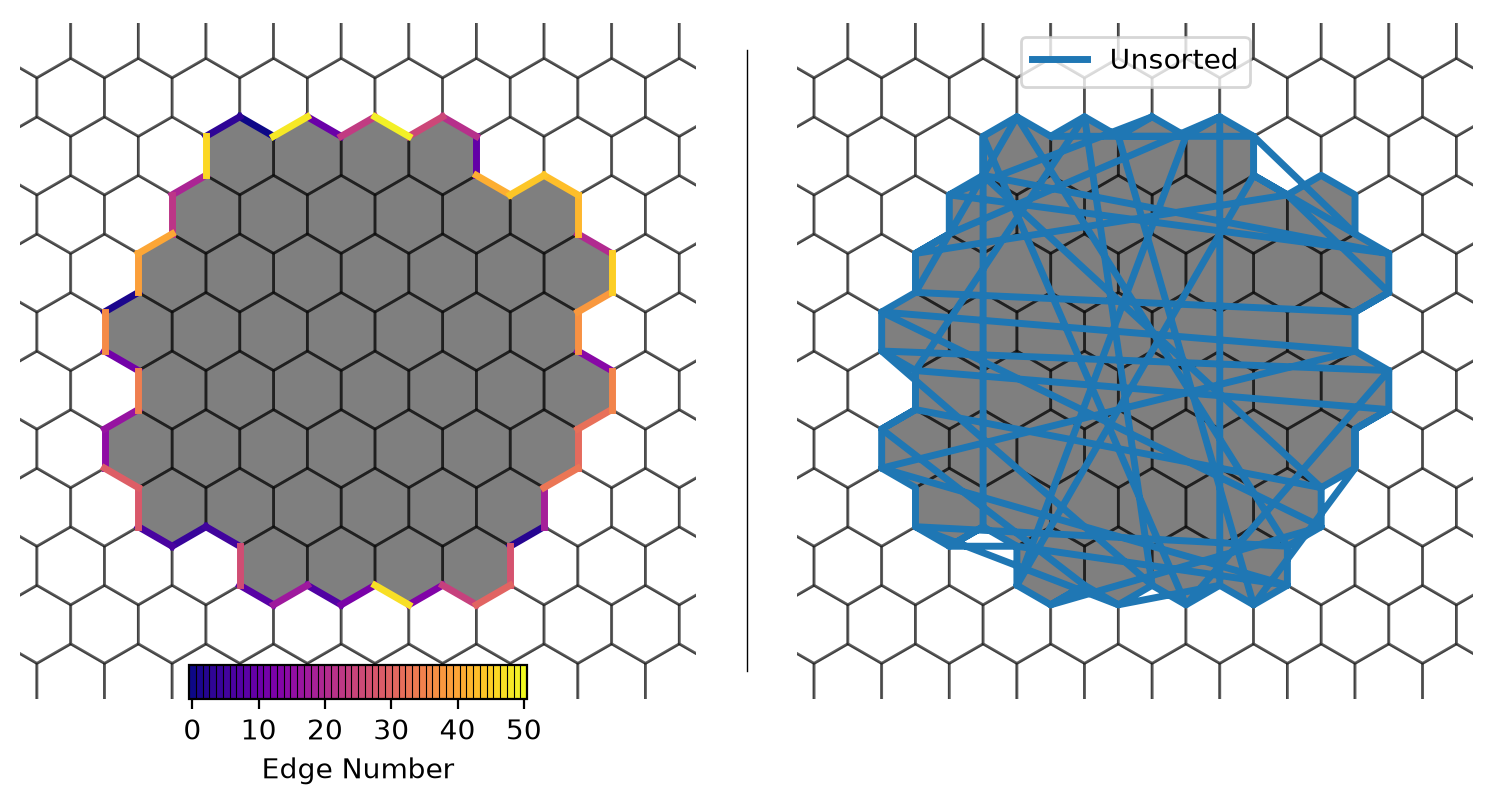
Figure 4. (Left) Contour boundary edges color coded by their index in the boundary edge list. (Right) An attempt to plot the boundary edges as polygon. Because of the near random order of edges around the contour, the resulting polygon is self-intersecting.
Unstrucuted Mesh Contours as Graphs#
Using the \(\mathrm{XOR}\) operator and the \(\mathrm{cellsOnEdge}\) connectivity array, we have identified the edges corresponding to the contour boundary. These contour edges are useful, but for plotting purposes what we are really interested in is an ordered sequence of vertices so that we can draw them as a continuous line. We can use the \(\mathrm{verticesOnEdge}\) connectivity array (\(\mathrm{nEdges} \times 2\)) for the subset of edges that correspond to the contour boundary to get the information we need. This subset of \(\mathrm{verticesOnEdge}\) naturally defines a graph, where mesh vertices become graph nodes and contour edges become graph edges.
The key structural property of this graph is that every node has degree at most 2; each contour vertex is shared by at most two contour edges (the one “entering” and the one “leaving”). This constraint means every connected component is one of exactly two topologies:
Path graph: an open arc whose two degree-1 endpoints lie on the domain boundary. The contour crosses the mesh boundary.
Cycle graph: a closed loop entirely within the domain interior where every node has degree exactly 2.
Because the maximum degree is 2, traversal reduces to a simple linear chain walk: at each step there is at most one unvisited neighbor. For a path, we start at one of the two degree-1 endpoints and walk to the other. For a cycle, we start at any node and walk until no unvisited neighbors remain, then close the loop by appending the start node.
This is implemented in the custom ContourGraph class in mosaic/contour.py. The walk() method performs the chain traversal, and components() uses an iterative depth-first search to enumerate connected components. No general graph library is required at runtime — NetworkX is available only as an optional testing utility via ContourGraph.to_networkx().
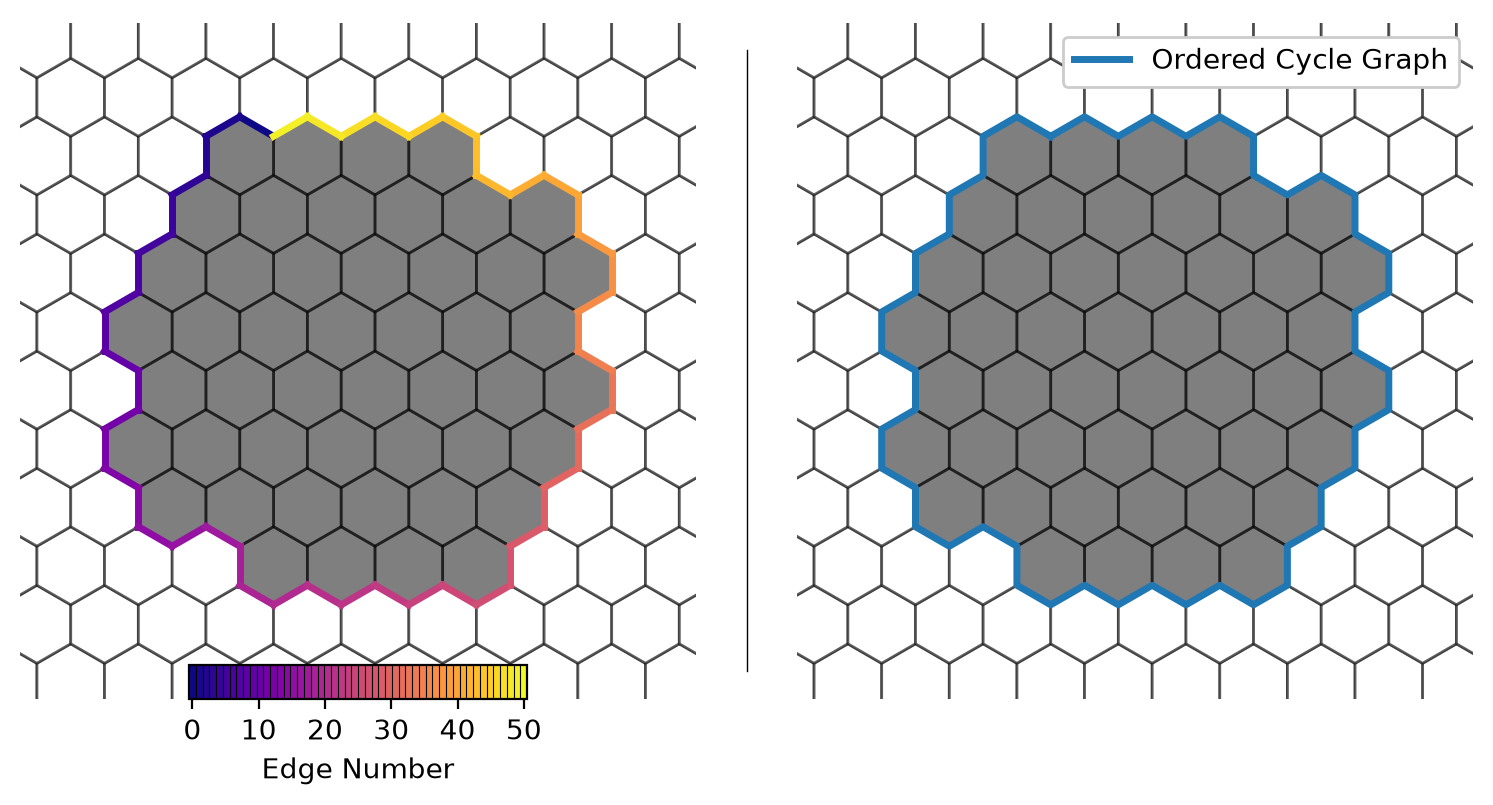
Figure 5. (Left) Ordered contour boundary edges color-coded by their index in the boundary edge list. (Right) Ordered contour boundary edges as a polygon. Because the graph traversal produces a sorted vertex sequence, the resulting polygon is valid (i.e. not self-intersecting).
With the ordered vertex sequence from the graph traversal, we can now plot the contour boundary as a polygon. This is the basic functionality we need to plot unstructured contour boundaries in matplotlib.
Before we move on, let’s quickly look at another way to delineate the contour boundary.
Interface#
With a basic sketch of the algorithmic approach outlined above, let’s now discuss how we will implement this in practice and how we envision a user interacting with it.
The goal is to provide contouring ability in mosaic where the interface to our contouring functions are as close as possible to matplotlib interface. Such that users can capitialize on their previous experience with matplotlib and seamlessly contour directly on the unstructed mesh.
Ideally, we will implement something like:
mosaic.contour(ax, descriptor, field, ...)
mosaic.contourf(ax, descriptor, field, ...)
where ... are the exact same keyword positional and key-word arguments as the matplotlib comensurate functions.
Unfilled Contours#
We’ll begin with unfilled contours (i.e. mosaic.contour), as they are simpler task.
Instead of such a simple gaussian field as we consider before, let’s work with something more complicated:
\(A\) is the amplitude
\(N\) is the period
\(L_{\rm x}\) and \(L_{\rm y}\) as the domain lengths in the \(x\) and \(y\) directions, respectively
We’ll also slightly increase the size of the mesh to be \(50 \times 50\) cells.
ds = planar_hex_mesh(100)

field = sinusoid(ds.xCell, ds.yCell)
descriptor = mosaic.Descriptor(ds)
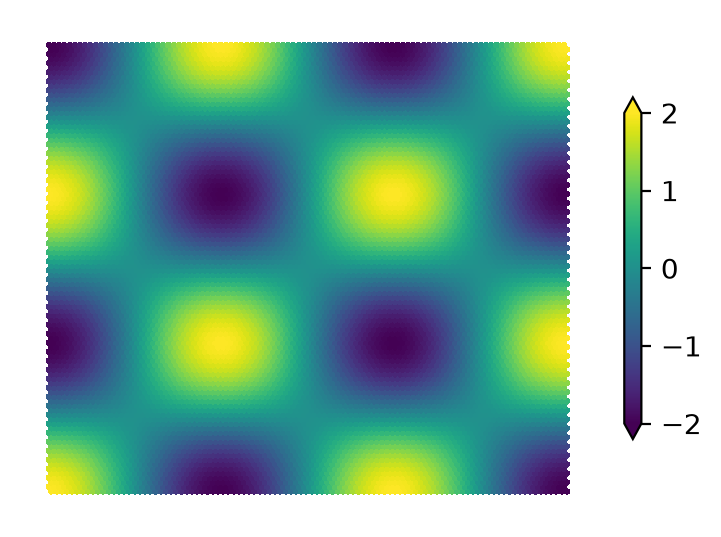
Figure 6. Checkerboard field, evaluated on a \(100 \times 100\) cell mesh.
A first step, let’s create the boolean
mask = field < 0.0
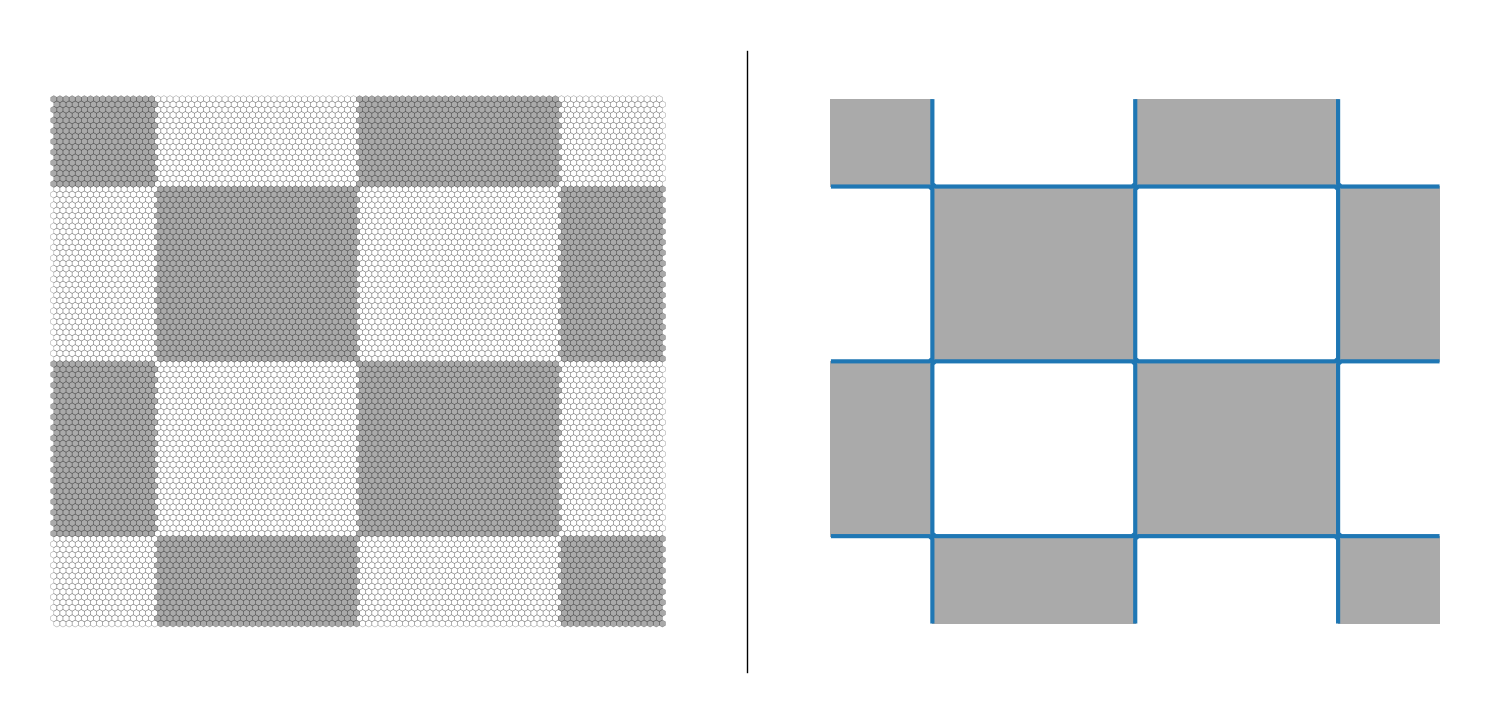
Figure 7. (Left) Boolean mask of \(f(x, y) < 0.0\) evaluated on the MPAS mesh. (Right) The same checkerboard field, evaluated and contoured on a regular quadrilateral mesh. Blue lines are the contour lines and grey is the filled contour area.
Boundaries
We can see from the matplotlib.pyplot.contour example above (RHS of Figure 7), that contour lines should be discontinuous when they intersect with a boundary. For example, while the plotted mask follows the plot boundary, the contour lines abruptly end. They do not from closed loops by using the boundary. We’ll mimic this behavior in mosaic.
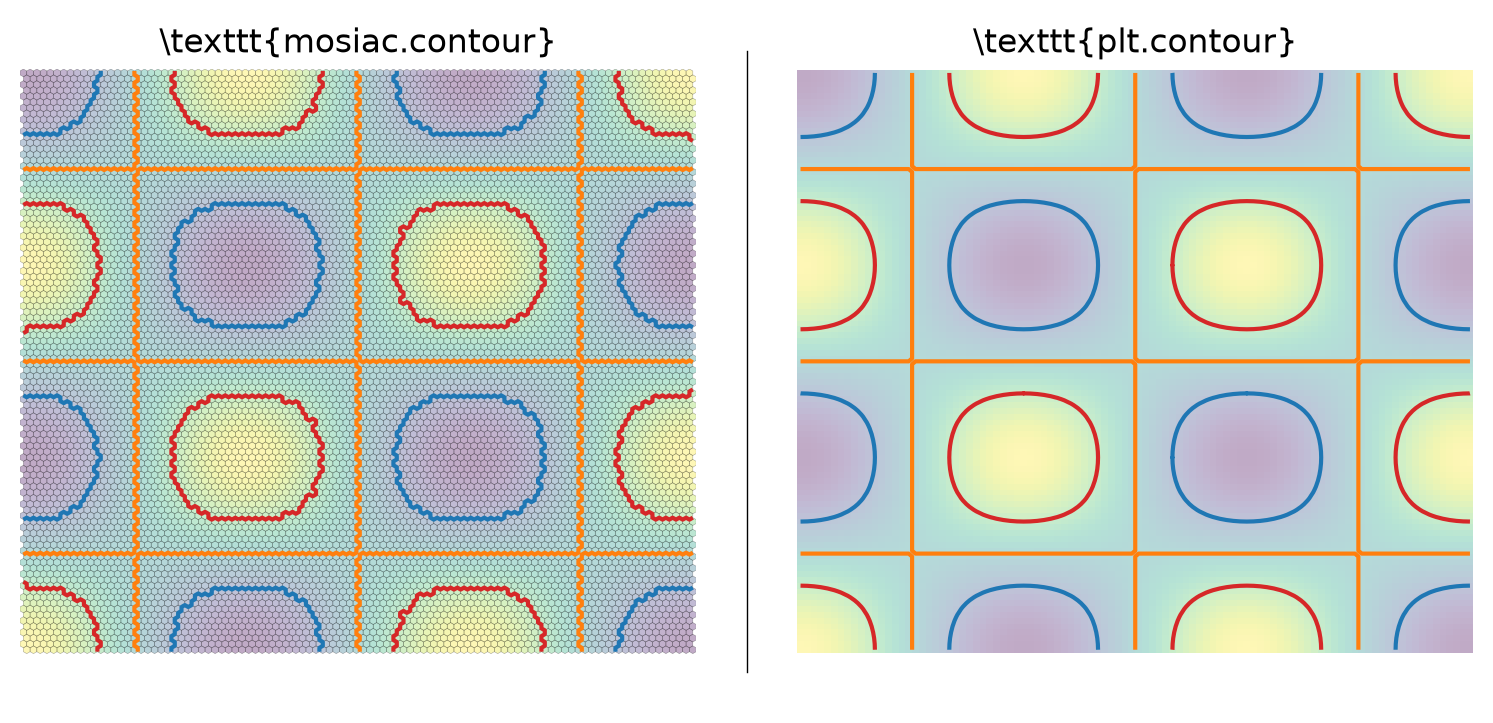
Figure 8. (Left) mosaic.contour result for contours at \(-1, 0, 1\) (blue, orange, red) of the checkerboard field, evaluated on the MPAS mesh. (Right) plt.contour of the same checkerboard field on a regular quadrilateral grid for comparison.
As we can see above, we get good agreement between our mosaic.contour implementation and the plt.contour result. The major difference is the jagged appearance of the MPAS contours due to the coarse resolution of the mesh, but this is desired feature of implementation. plt.contour does linear interpolation, which produces the smooth boundaries, but that is not something we want (or at least on all the time). Future work will investigate adding optional support for smooth contours.
Filled Contours#
Filled contours, specifically the possibility of interior boundaries, presents a challenge to our treatment so far mesh contours as graphs. To illustrate this challenge we will visualize two, multi-component, isomorphic graphs, which according to graph theory are equivalent.
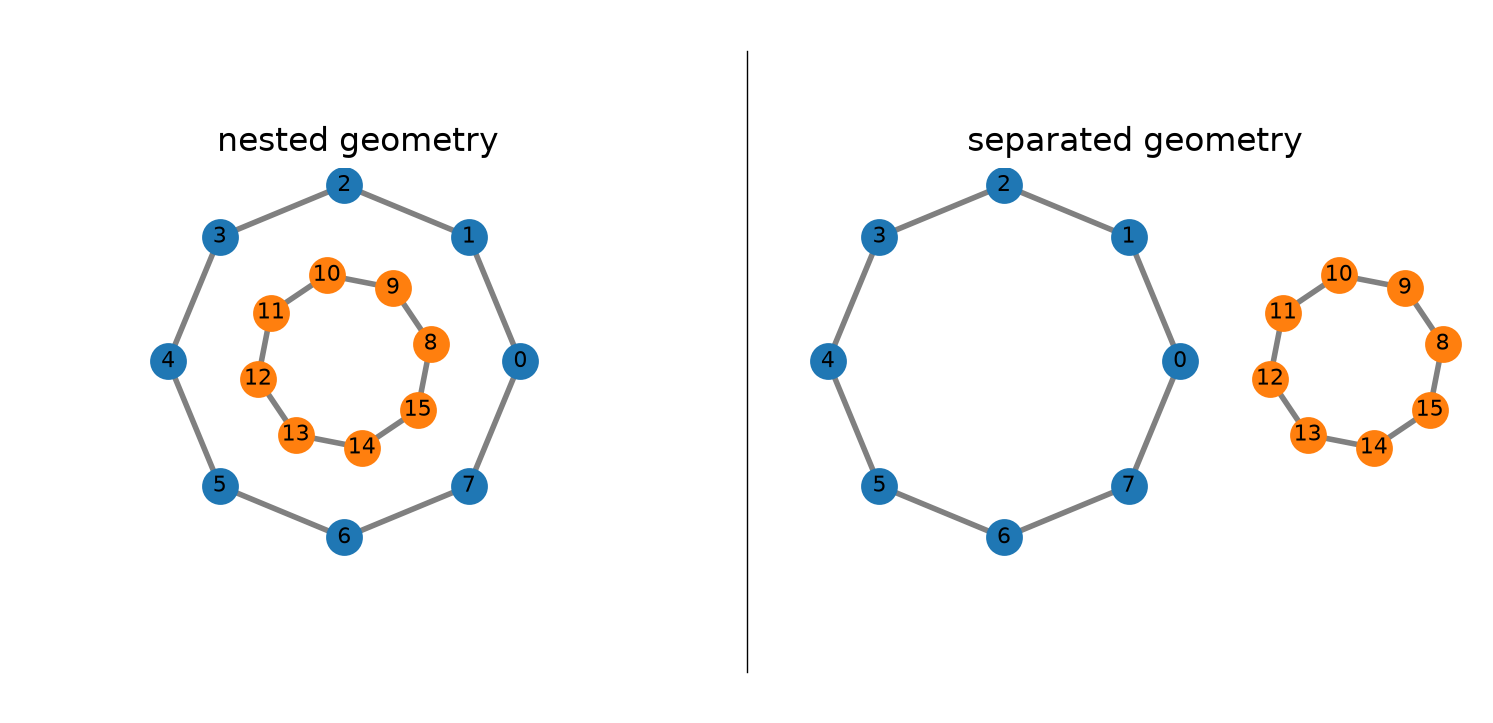
Figure 9. Two multi-componnet isomorphic graphs, plotted using their coordinate information.
As far a graph theory is concerned, the two graphs above are equivalent. Because we use the coordinate information to plot these graphs, we can see an important distinction: the graph on the left is nested where the graph on the right is separated.
For filled contours, Figure 9. is a crude, but illustrative, example of a contour with an interior boundary. So far we only used the mesh connectivity information to create the unfilled contour boundaries, where coordinate information has only been used to plotting. But, for filled contours after creating the contour boundaries from the connectivity information, we’ll need to use coordinate info to recursively search of interior boundaries within the resulting contours.
We can efficiently recursively search for interior boundaries using shapely.STRtree, which uses the bounding boxes of each geometry to query for containment.
Relative Ordering#
One final matplotlib consideration, is the relative ordering (ie., clockwise vs counter-clockwise) of interior boundaries relative to their exterior boundaries.
In order for an interior boundary to be unfilled, as intended, it’s relative order must be opposite the relative order of the exterior boundary.
For more information about this, refer to the matplotlib documentation: here.
Following the matplotlib documentation
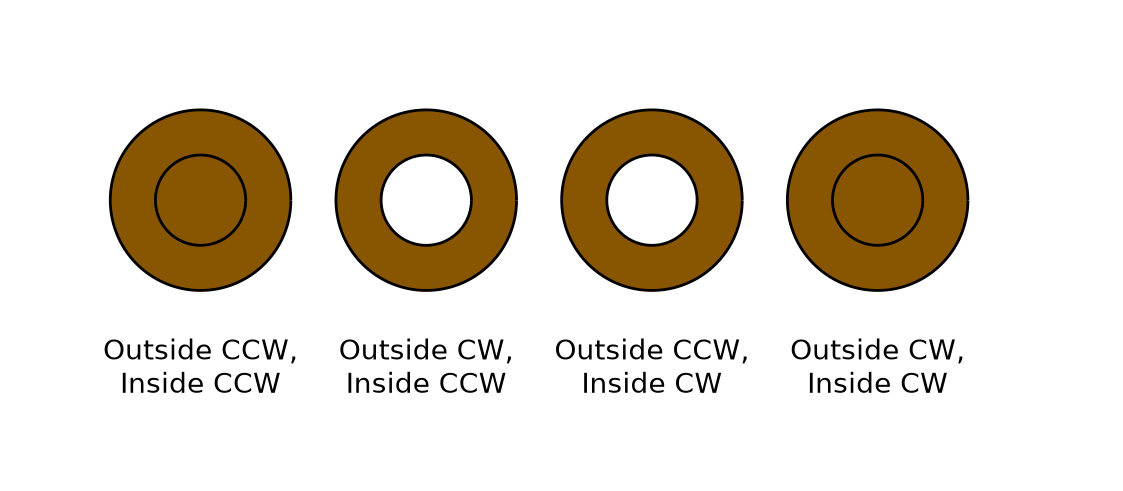
Figure 10. Illustration of the importance of the interior vs. exterior relative ordering for rendering interior boundaries.
So, with above considerations in mind let’s return to the same sine field, evaluated on a \(100 \times 100\) cell mesh.
Figure 11. Checkerboard field, evaluated on a \(100 \times 100\) cell mesh.
Like filled contouring, our first step will be to create the boolean mask. Because this is a filled contour we will need both an upper and lower bound (cf., unfilled).
cell_mask = (field > -1.0) & (field < 0.0)
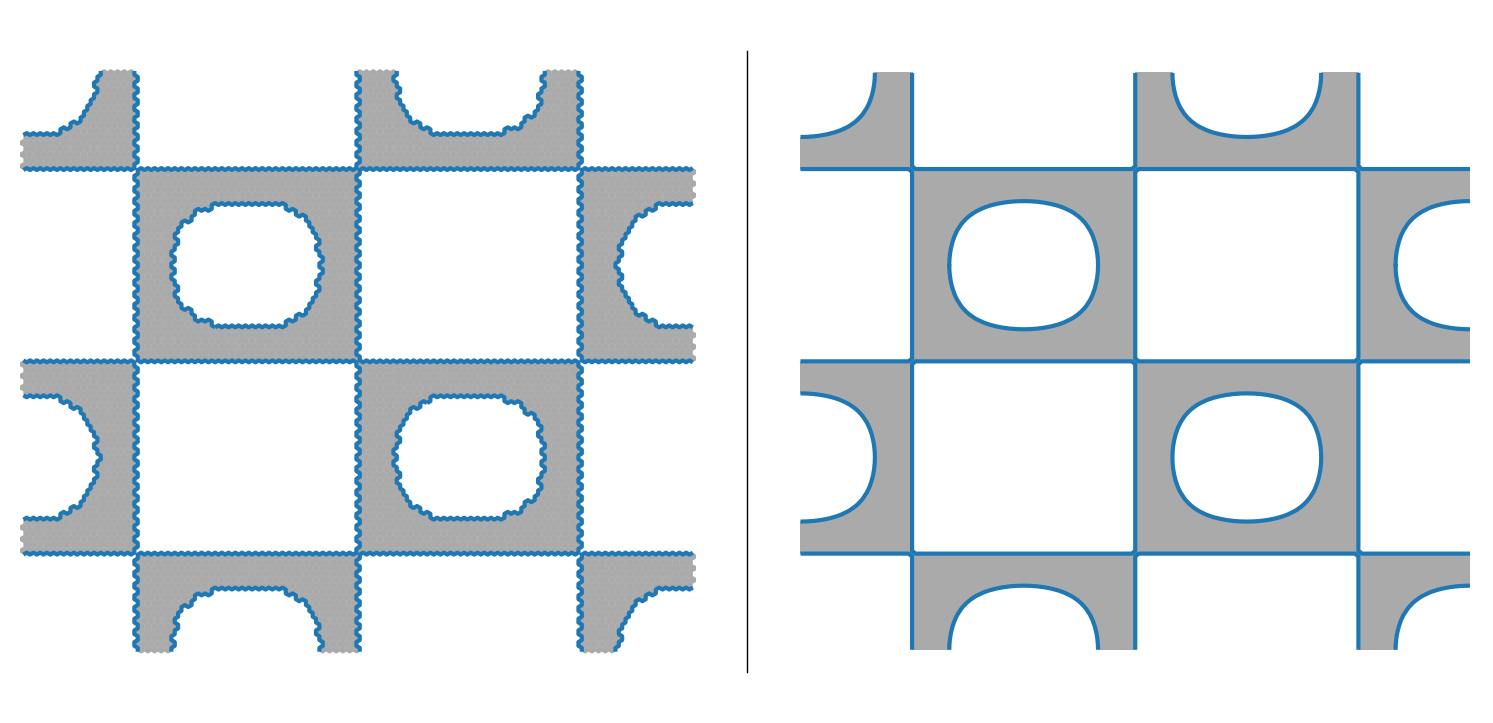
Figure 12. (Left) Boolean mask of \(-1.0 < f(x, y) < 0.0\) evaluated on the MPAS mesh. (Right) The same checkerboard field, evaluated and contoured on a regular quadrilateral mesh. The grey is the filled contour area.
As a first step, we will use the exact same steps as unfilled contours to extract and sort the contour boundaries using the connectivity information. One important difference between the filled (grey) and unfilled (blue lines) is that the filled contours follow the mesh boundary.
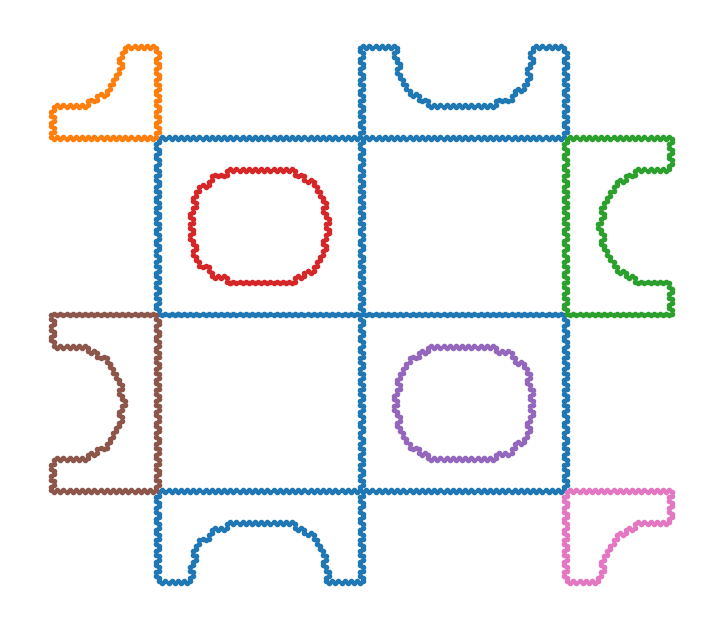
Figure 13. The contour boundaries identified just using connectivity information. Each unique contour component has it’s own color. Notice the pink and brown boundaries are really interior boundaries of the blue contour, but just using connectivity information alone is not enough to identify this.
We will now used the coordinate information to recursively search for containment of our contour components.
If we find an interior boundary during this recursive search, we will also ensure it’s relative order is opposite it’s parent to ensure proper plotting in matplotlib once we will the contours.
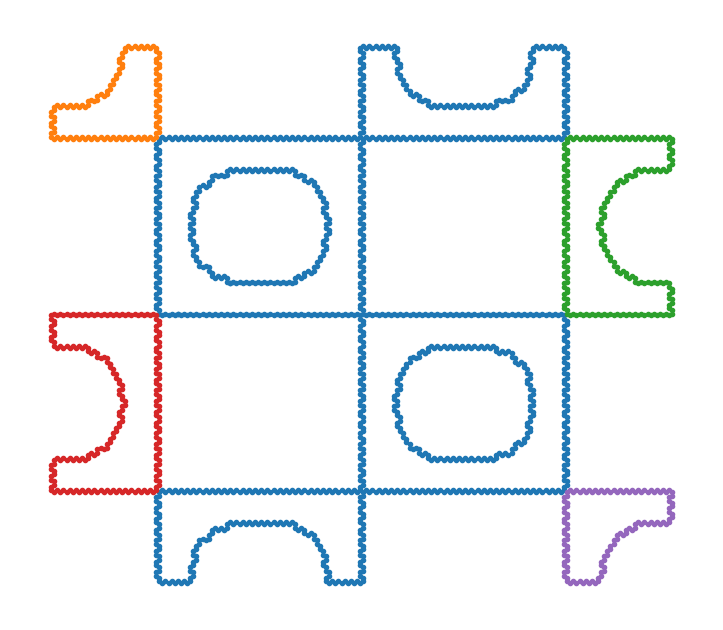
Figure 14. The contour boundaries identified after recursively search for containment using the coordinate information. Notice the interior boundaries of the blue contour are now blue as we’d expect.
With all this in hand, we now have a fully functional filled contour algorthinm.
Now let’s see it in practice and compare to our matplotlib regularly spaced reference.
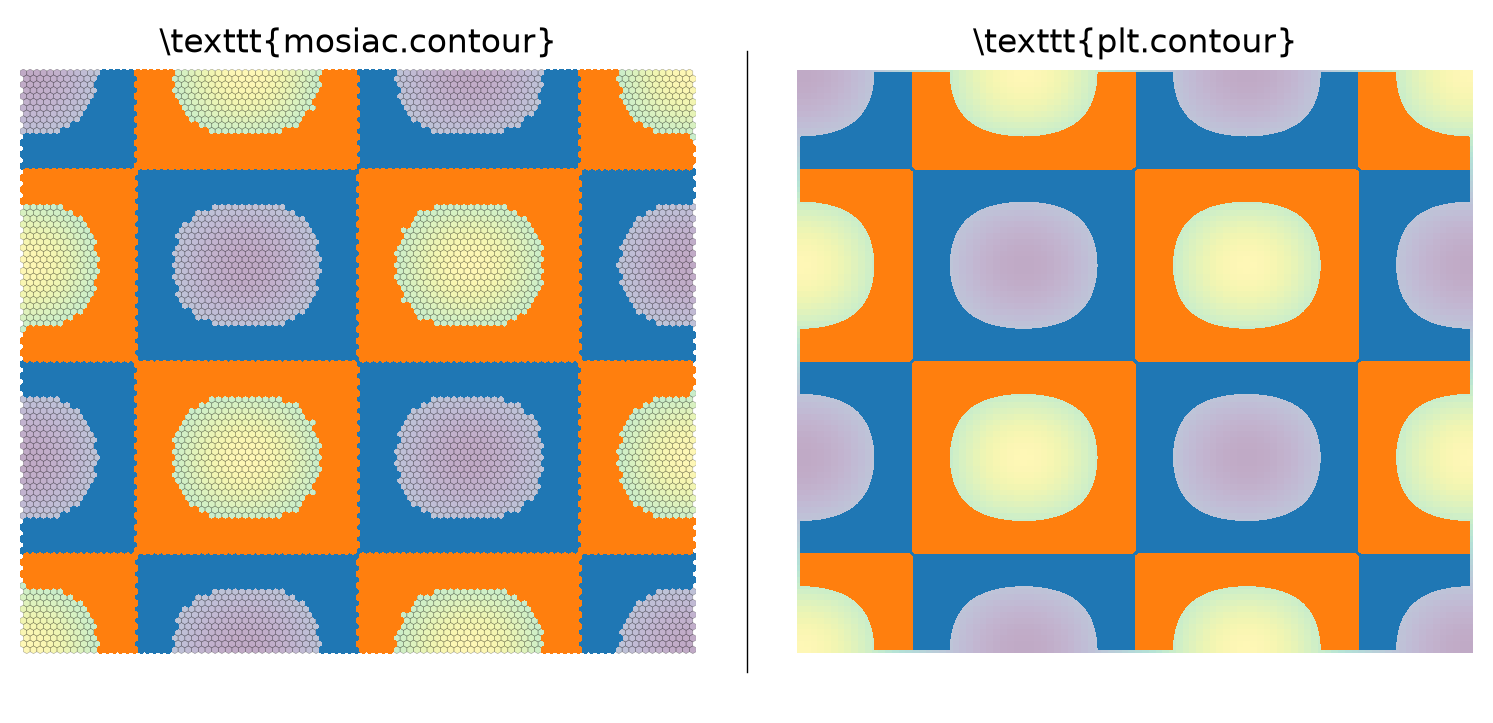
Figure 15. mosaic.contourf result for filled contour levels of \(-1, 0, 1\) of the checkerboard field, evaluated on the MPAS mesh. (Right) plt.contourf of the same checkerboard field on a regular quadrilateral grid for comparison.
As we can see above, we also get good agreement between our mosaic.contourf implementation and the plt.contourf result.
Again, the major difference is the jagged appearance of the MPAS contours due to the coarse resolution of the mesh, but this is desired feature of implementation.
Future Work#
Smooth (interpolated) contours:#
https://www.boristhebrave.com/2018/04/15/marching-cubes-tutorial/
https://www.cs.wustl.edu/~taoju/cse554/lectures/lect04_Contouring_I.pdf
https://www.cse.wustl.edu/~taoju/research/dualContour.pdf
https://en.wikipedia.org/wiki/Marching_squares
Marching Squares implementation:#
skimagehas acythonbased marching squares implementation that we could probably easily port to marching triangles.https://github.com/scikit-image/scikit-image/blob/main/src/skimage/measure/_find_contours_cy.pyx