Topography Tasks
The polaris.tasks.e3sm.init.topo module provides tools for working with
topography data in Polaris. This includes steps for processing, modifying, and
combining topography datasets to create inputs for E3SM components such as
MPAS-Ocean. The framework is designed to handle both global and regional
datasets, supporting various grid types like lat-lon and cubed-sphere grids.
Combine Steps and Tasks
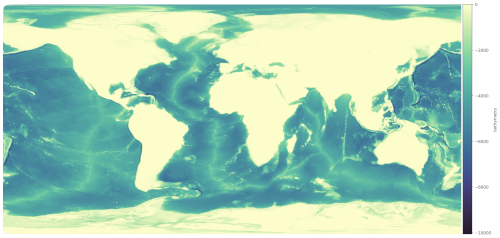
Global bathymetry datasets do not typically include the latest datasets around Antarctica needed for ice-sheet and ice-shelf modeling. For this reason, we typically combine a global topography dataset north of the Southern Ocean with one for Antarctica.
Note
At the moment, the step for combining these datasets provides fields that are masked to locations where the bed topography (bathymetry) is below sea level. This avoids the risk of interpolated topography resulting in a bed that is above sea level in ocean regions when we perform further interpolation of the data to an MPAS mesh. However, a more general topography dataset will likely be needed in the future that accommodates both the ocean and land/river components.
The polaris.tasks.e3sm.init.topo.combine.CombineStep step is a key
component of the topography framework. It is responsible for combining global
and Antarctic topography datasets into a single dataset suitable for use in
E3SM simulations. The step supports blending datasets across specified latitude
ranges and remapping them to a target grid.
The polaris.tasks.e3sm.init.topo.combine.CombineTask wraps the
CombineStep into a task that can be used to generate and cache combined
topography datasets for reuse in other contexts.
The polaris.tasks.e3sm.init.topo.combine.VizCombinedStep step is
an optional visualization step that can be added to the workflow to create
plots of the combined topography dataset. This step is particularly useful for
debugging or analyzing the combined dataset.
High-Resolution and Low-Resolution Versions
There are two versions of the combine steps and task:
Standard (High-Resolution) Version: This version maps to a high-resolution (ne3000, ~1 km) cubed-sphere grid by default, producing topogrpahy that is suitable for remapping to standard and high-resolution MPAS meshes (~60 km and finer).
Low-Resolution Version: This version uses a coarser ne120 (~25 km) grid for faster remapping to coarse-resolution MPAS meshes (e.g., Icos240). It is designed to reduce computational cost while still providing adequate accuracy for low-resolution simulations used for regression testing rather than science.
The low-resolution version can be selected by setting the low_res parameter
to True when creating the CombineStep or CombineTask.
Key Features
Dataset Support: Supports multiple datasets, including
bedmap3,bedmachinev3, andgebco2023.Grid Types: Handles both lat-lon and cubed-sphere target grids.
Blending: Blends global and Antarctic datasets across a configurable latitude range.
Remapping: Uses tools like
mbtempest,ESMF_RegridWeightGenandncremapfor remapping datasets to the target grid.Output: Produces combined topography datasets with consistent variables and attributes.
Visualization: Generates rasterized images of various fields (e.g., bathymetry, ice draft) using the
datashaderlibrary.
Configuration Options
The CombineStep step is configured through the [combine_topo] section in
the configuration file. Key options include:
resolution_latlon: Target resolution for lat-lon grids (in degrees).resolution_cubedsphere: Target resolution for cubed-sphere grids (e.g.,3000for NExxx grids).latminandlatmax: Latitude range for blending datasets.ntasksandmin_tasks: Number of MPI tasks for remapping.method: Remapping method (e.g.,bilinear).
For the low-resolution version, additional configuration options are provided
in the combine_low_res.cfg file.
Workflow
Setup: The step downloads required datasets and sets up input/output files.
Modification: Antarctic and global datasets are modified to include necessary variables and attributes.
Remapping: Datasets are remapped to the target grid using SCRIP files and weight generation.
Blending: The datasets are blended across the specified latitude range.
Output: The combined dataset is saved in NetCDF format.
Optional Field Plotting: Each field in the dataset is rasterized and saved as an image with a colorbar.
Example Usage
Below is an example of how the CombineStep can be added to a Polaris
task:
from polaris.tasks.e3sm.init.topo.combine import CombineStep

component = task.component
subdir = CombineStep.get_subdir(low_res=False)
if subdir in component.steps:
    step = component.steps[subdir]
else:
    step = CombineStep(component=component, low_res=False)
    component.add_step(step)
task.add_step(step)
To create a CombineTask for caching combined datasets:
from polaris.tasks.e3sm.init.topo.combine import CombineTask

combine_task = CombineTask(component=my_component, low_res=False)
my_component.add_task(combine_task)
Below is an example of how the VizCombinedStep can be added to a Polaris task:
from polaris.tasks.e3sm.init.topo.combine import VizCombinedStep

viz_step = VizCombinedStep(component=my_component, combine_step=combine_step)
my_component.add_step(viz_step)
Since there is a single shared step for each pair of Antarctic and global
datasets, the step should be added only once to the component and the existing
step (identifiable via its subdir) should be used subsequently.
The VizCombinedStep is typically added only when visualization is explicitly required, as it is not part of the default workflow.
For more details, refer to the source code of the
polaris.tasks.e3sm.init.topo.combine.CombineStep and
polaris.tasks.e3sm.init.topo.combine.CombineTask classes.
Note
Since this step is expensive and time-consuming to run, most tasks will want to use cached outputs from this step rather than running it in full.